Connect with us

Education

Millas a KM: The Complete Guide to Converting Miles to Kilometers (Fast & Accurate)

Published

on

millas a km

Millas a KM: The Complete Guide

Distance measurement is an essential part of everyday life, whether you are planning a road trip, following GPS directions, studying geography, tracking your fitness progress, or traveling internationally. While many countries use kilometers as their standard unit of measurement, countries such as the United States and the United Kingdom commonly use miles for roads, navigation, and speed limits. This difference often creates confusion for travelers, students, athletes, and professionals who need to understand distances accurately. Searching for millas a km is one of the fastest ways to find reliable conversion information that helps bridge the gap between these two measurement systems.

Understanding how to convert miles into kilometers is more than just memorizing a formula. It allows you to read international maps confidently, compare driving distances between countries, interpret marathon lengths, understand cycling routes, and even analyze weather forecasts that mention travel distances. Whether you are converting one mile or hundreds of miles, knowing the correct conversion method ensures accuracy in every situation.

What Does “Millas a KM” Mean?

The phrase millas a km simply means converting miles into kilometers. A mile is part of the Imperial and US customary systems of measurement, while a kilometer belongs to the metric system used in most countries worldwide. Since both units measure distance, they can be converted using a fixed mathematical relationship.

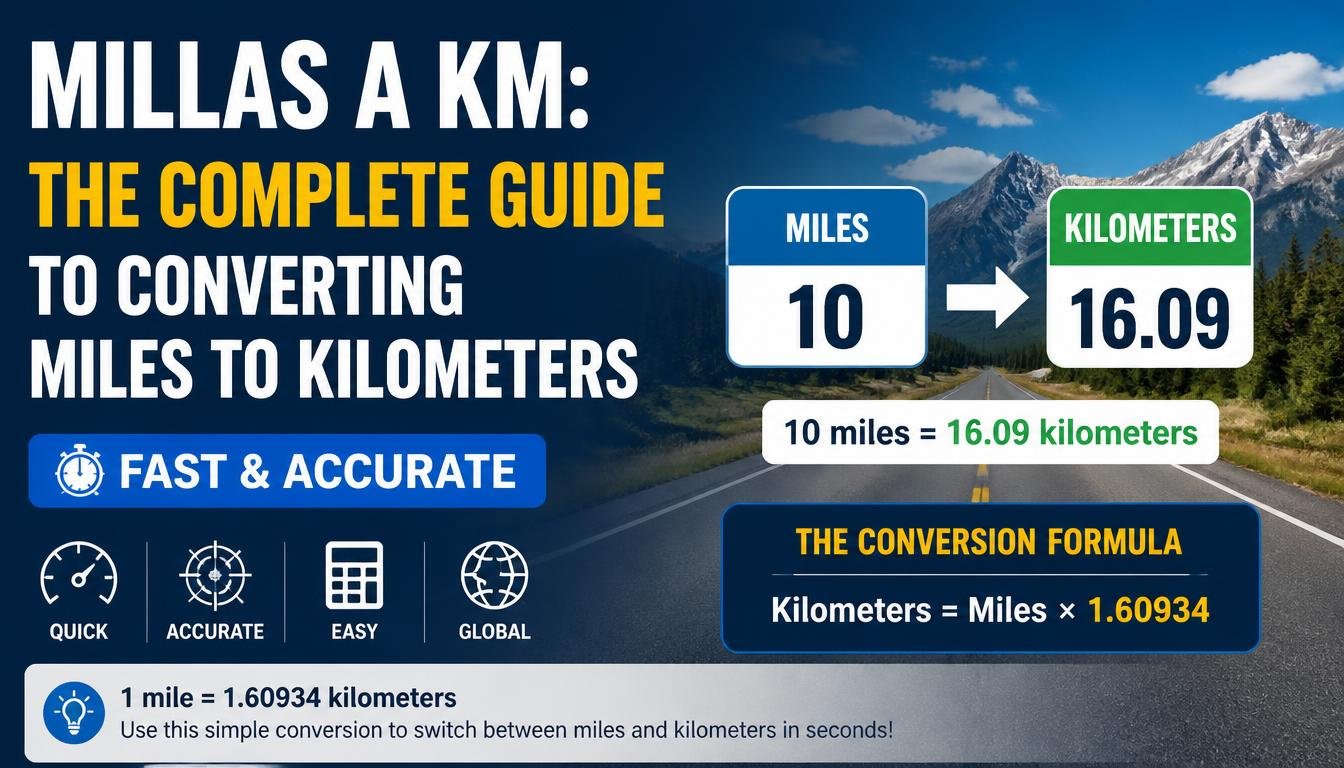
One international mile is exactly equal to 1.609344 kilometers. This internationally recognized standard is used in science, engineering, transportation, aviation, education, and mapping applications around the world.

The Miles to Kilometers Formula

The conversion formula is extremely simple:

Kilometers = Miles × 1.609344

Whenever you know the number of miles, multiply it by 1.609344 to obtain the equivalent distance in kilometers.

Example 1

5 miles × 1.609344 = 8.04672 km

Example 2

25 miles × 1.609344 = 40.2336 km

Example 3

100 miles × 1.609344 = 160.9344 km

Because the conversion factor never changes, this formula works for every distance measurement.

Quick Millas a KM Conversion Chart

MilesKilometers
11.61 km
23.22 km
58.05 km
1016.09 km
2032.19 km
2540.23 km
3048.28 km
4064.37 km
5080.47 km
6096.56 km
75120.70 km
100160.93 km
150241.40 km
200321.87 km
500804.67 km

This table provides quick reference values without needing to calculate manually.

Why Do Different Countries Use Different Units?

The metric system was developed to provide a universal and standardized way to measure distance, weight, and volume. Today, almost every country in the world uses kilometers for road signs and maps. However, the United States continues to use miles for highways, speed limits, and navigation. The United Kingdom also uses miles on road signs, although many scientific and educational fields there rely on the metric system.

As international tourism and global business continue to grow, converting millas a km has become a common need for millions of people every day.

Common Uses of Miles to Kilometers Conversion

Distance conversion is valuable in numerous real-world situations. Travelers frequently need to convert driving distances when visiting another country. Athletes compare marathon routes, cycling events, and running races that may be listed in either miles or kilometers. Students learn unit conversions in mathematics and science classes, while logistics companies use both systems for shipping and transportation planning. GPS devices and mapping applications also perform these conversions automatically to provide accurate navigation regardless of the country being visited. Understanding the conversion yourself helps you interpret this information more confidently.

How to Convert Millas a KM Without a Calculator

Although calculators make conversions quick, you can estimate distances mentally. A useful trick is to remember that one mile is slightly more than one and a half kilometers. Multiplying by 1.6 instead of 1.609344 gives a close approximation that works well for everyday use. For example, 10 miles is approximately 16 kilometers, 50 miles is about 80 kilometers, and 100 miles is roughly 161 kilometers. While this shortcut is not perfectly precise, it is accurate enough for travel, walking, and general planning.

Miles vs. Kilometers

Although miles and kilometers measure the same thing, they differ significantly in size. One mile is longer than one kilometer, meaning fewer miles are needed to describe the same distance. For example, a road that measures 160 kilometers is approximately 100 miles long. This difference explains why speed limits and driving distances often appear smaller when displayed in miles than when shown in kilometers.

Benefits of Learning Miles to Kilometers Conversion

Learning to convert miles into kilometers improves your understanding of maps, international travel, fitness tracking, sports events, and educational materials. Instead of relying entirely on online tools, you gain the ability to estimate distances quickly in everyday situations. Whether reading an international travel guide, planning a road trip, or participating in a race abroad, this knowledge helps you make informed decisions without confusion.

Common Conversion Mistakes

One of the most frequent mistakes is reversing the formula and dividing instead of multiplying. Another error is assuming that one mile equals one kilometer, which leads to significant inaccuracies over longer distances. Some people also round the conversion factor too aggressively, reducing precision for scientific or engineering calculations. Using the correct factor of 1.609344 ensures accurate results every time.

Conclusion

Converting millas a km is a simple yet valuable skill that benefits travelers, students, athletes, professionals, and anyone working with international distance measurements. By remembering the formula Kilometers = Miles × 1.609344, you can accurately convert any distance from miles into kilometers in seconds. Whether you are planning a vacation, reading a map, tracking your fitness goals, or studying mathematics, understanding this conversion helps eliminate confusion and ensures precise communication across different measurement systems. With the examples, conversion chart, and practical tips provided in this guide, you now have everything you need to convert miles to kilometers confidently and accurately whenever the need arises.

Frequently Asked Questions (FAQ)

What does “millas a km” mean?

It means converting miles into kilometers using the standard conversion factor.

How many kilometers are in one mile?

One mile equals exactly 1.609344 kilometers.

What is the easiest miles to kilometers formula?

Multiply the number of miles by 1.609344.

Is one kilometer longer than one mile?

No. One mile is longer than one kilometer.

Why do most countries use kilometers?

The metric system is internationally standardized, making communication, science, engineering, and transportation more consistent worldwide.

Can I estimate miles to kilometers by multiplying by 1.6?

Yes. Multiplying by 1.6 provides a quick estimate that is suitable for most everyday situations.

Is the conversion factor ever different?

No. One international mile is always equal to 1.609344 kilometers.
Continue Reading

Education

OnCourse Connect: Complete Guide to Login, Features, Benefits & Student Portal (2026)

Published

on

oncourse connect

Modern schools rely heavily on technology to keep students, teachers, parents, and administrators connected in one secure digital environment. Instead of depending on paper reports, phone calls, or multiple applications, many educational institutions now use comprehensive school management platforms that centralize academic information and communication. One such platform is OnCourse Connect, a web-based portal designed to simplify school communication while giving users quick access to grades, attendance records, assignments, schedules, announcements, and important school updates.

Whether you are a student checking your latest assignments, a parent monitoring your child’s academic progress, or a teacher sharing classroom updates, OnCourse Connect provides a streamlined experience that saves time and improves collaboration. In this detailed guide, you’ll learn everything about OnCourse Connect, including its features, login process, benefits, common problems, security practices, and why many schools continue to rely on it as their primary communication platform.

What Is OnCourse Connect?

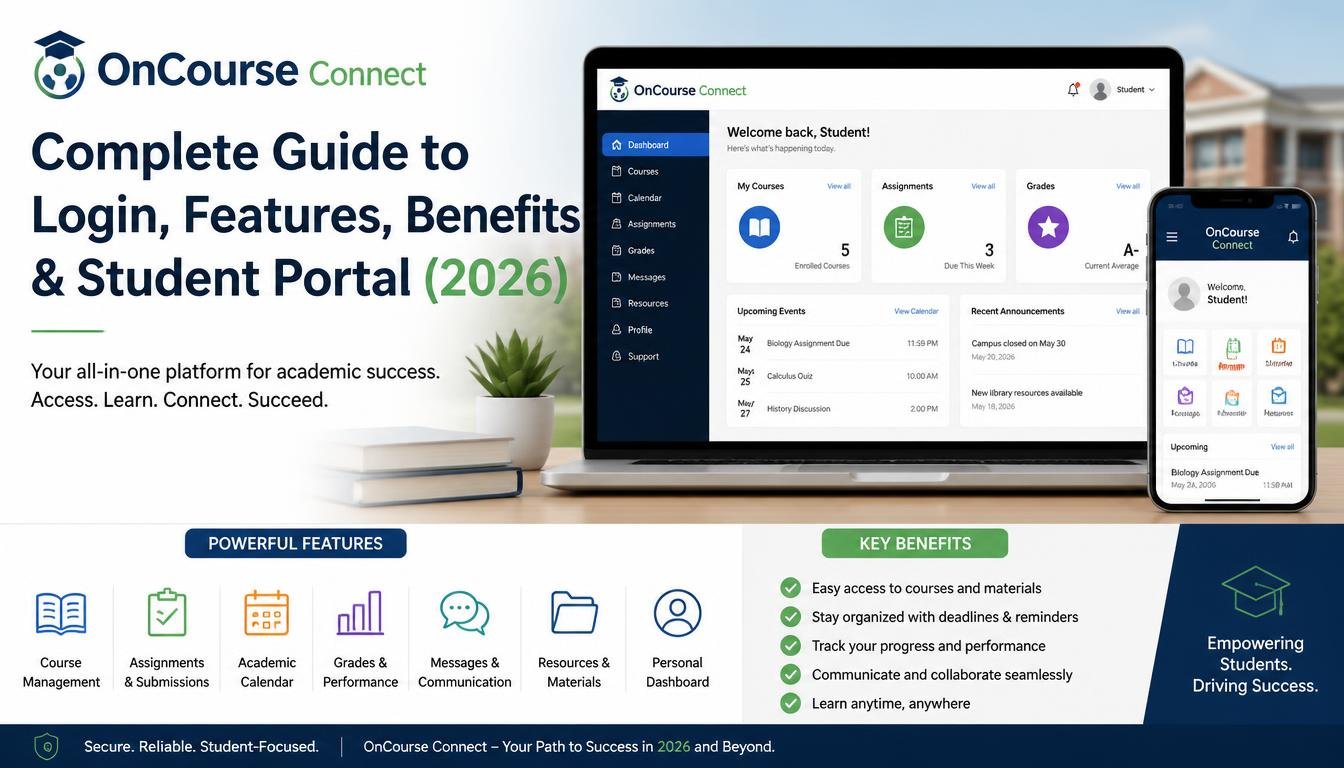
OnCourse Connect is an online school communication and student information platform that allows students, parents, teachers, and school administrators to access educational information through a secure portal. It acts as the connection point between home and school by keeping everyone informed about academic progress and school activities in real time.

Rather than using multiple systems for attendance, grades, report cards, messaging, schedules, and announcements, OnCourse Connect combines these essential tools into one centralized platform. Schools using the system can reduce paperwork, improve communication, and ensure that important information reaches families quickly and efficiently.

Because every participating school may configure the platform differently, the exact features available to users can vary depending on the institution.

Who Uses OnCourse Connect?

The platform is designed for multiple user groups, each with different permissions and responsibilities.

Students

Students use OnCourse Connect to:

  • View grades
  • Check homework
  • Access assignments
  • Review attendance
  • See class schedules
  • Receive teacher announcements
  • Track academic performance

Students benefit from having all of their educational information available in one convenient location, helping them stay organized and meet academic deadlines.

Parents

Parents can use the portal to:

  • Monitor attendance
  • Review grades
  • Read teacher messages
  • Receive school announcements
  • View report cards
  • Follow assignment progress
  • Stay informed about upcoming events

This transparency helps parents become more involved in their children’s education without needing constant communication with school staff.

Teachers

Teachers use OnCourse Connect for:

  • Posting assignments
  • Recording attendance
  • Updating grades
  • Sharing classroom announcements
  • Messaging parents
  • Managing student records
  • Publishing report cards

Having these tools within one platform simplifies administrative work and allows teachers to spend more time focusing on instruction.

School Administrators

Administrators rely on the platform to manage school operations, including student enrollment, attendance records, scheduling, report generation, and communication with families. Centralized data also supports planning, compliance, and overall school management.

Key Features of OnCourse Connect

One of the main reasons schools choose OnCourse Connect is its broad set of integrated features. Instead of using separate applications for different tasks, users can complete many daily activities from a single dashboard.

Student Dashboard

Students receive a personalized dashboard displaying current classes, upcoming assignments, grades, attendance summaries, and school announcements.

Online Gradebook

The online gradebook allows students and parents to review academic performance throughout the school year instead of waiting for report cards. Teachers can update grades as new assignments, quizzes, or exams are completed.

Attendance Tracking

Attendance is updated electronically, allowing families to quickly identify absences, tardiness, or attendance trends. This helps schools address attendance issues more proactively.

Assignment Management

Teachers can post homework, project deadlines, and classroom resources. Students can review upcoming tasks and organize their schedules more effectively.

Messaging System

Built-in messaging enables direct communication between teachers, parents, students, and administrators. This reduces reliance on paper notices and improves response times.

School Announcements

Schools can publish announcements related to weather closures, events, exams, sports activities, and important deadlines, ensuring that families receive timely information.

Calendar Integration

Many schools use the platform’s calendar to display holidays, examinations, parent-teacher conferences, extracurricular activities, and other important dates.

Report Cards

Digital report cards allow parents and students to access academic results online, making it easier to review performance over time.

How to Log In to OnCourse Connect

Accessing the platform is generally straightforward:

  1. Visit your school’s OnCourse Connect portal.
  2. Enter your assigned username.
  3. Type your password.
  4. Complete any required verification steps if enabled.
  5. Click Log In.

If you experience login issues, contact your school’s technology department or administrative office, as login credentials are managed by the school.

Benefits of Using OnCourse Connect

The platform provides advantages for every member of the school community.

Students stay informed about assignments and grades, allowing them to manage their time more effectively and take greater responsibility for their learning.

Parents gain visibility into their child’s educational progress through real-time updates, making it easier to support learning at home and communicate with teachers when needed.

Teachers reduce administrative overhead by handling attendance, grading, announcements, and communication within a single system instead of multiple disconnected tools.

Schools improve operational efficiency, reduce paper usage, and maintain more consistent communication with families.

Security and Privacy

Educational data is sensitive, so platforms like OnCourse Connect typically use secure login systems, encrypted connections, and role-based access controls to help protect student information. Schools determine user permissions and should follow applicable privacy regulations in their jurisdiction. Users should keep passwords private, use strong credentials, and log out after using shared devices.

Common Login Problems

Users may occasionally encounter login difficulties.

Incorrect Password

Double-check capitalization and ensure that Caps Lock is not enabled.

Forgotten Password

Use your school’s password reset process or contact the school’s IT support if self-service recovery is unavailable.

Browser Issues

Clear your browser cache, update your browser, or try another supported browser if pages do not load correctly.

Account Disabled

Some accounts may be temporarily disabled after multiple failed login attempts. Contact your school administrator for assistance.

Tips for Getting the Most Out of OnCourse Connect

To maximize the platform’s usefulness:

  • Check the portal regularly for announcements.
  • Review grades frequently rather than waiting for report cards.
  • Enable notifications if your school offers them.
  • Keep contact information up to date.
  • Communicate with teachers through the messaging system when needed.
  • Use the calendar to track important school dates.
  • Protect your account with a strong, unique password.

Why Schools Choose OnCourse Connect

Schools select OnCourse Connect because it centralizes communication, academic records, attendance, scheduling, and reporting into one platform. This reduces administrative complexity while providing families with a single place to access important educational information. The platform also encourages stronger collaboration between teachers, students, and parents, which can contribute to a more connected learning environment.

Conclusion

OnCourse Connect has become a valuable tool for schools seeking to improve communication and simplify access to academic information. By bringing grades, attendance, assignments, schedules, messaging, and announcements together in one secure portal, it helps students stay organized, keeps parents informed, and enables teachers to manage classroom tasks more efficiently. Whether you are logging in for the first time or looking to make better use of the platform, understanding its features and best practices can help you get the most from your school’s digital learning environment.

Frequently Asked Questions (FAQ)

1. What is OnCourse Connect?

OnCourse Connect is a school communication and student information platform that allows students, parents, teachers, and administrators to access grades, attendance, assignments, schedules, and school announcements.

2. Who can use OnCourse Connect?

Access is typically provided to students, parents, teachers, and school administrators whose schools subscribe to the platform.

3. How do I log in to OnCourse Connect?

Use the login credentials provided by your school and access the school’s designated OnCourse Connect portal.

4. Can parents monitor student grades?

Yes. Parents can usually view grades, attendance, assignments, report cards, and teacher communications, depending on the permissions configured by the school.

5. What should I do if I forget my password?

Follow your school’s password recovery process or contact the school’s IT department or administrator for assistance.

6. Is OnCourse Connect available on mobile devices?

Many schools allow access through mobile web browsers, and some may provide mobile-friendly access depending on their implementation.

7. Is student information secure?

The platform is generally designed with security features such as encrypted connections and user authentication, but schools are responsible for account management and configuration.

8. Can teachers communicate with parents through OnCourse Connect?

Yes. The platform typically includes messaging and announcement tools that help facilitate communication between teachers and families.

9. Does OnCourse Connect display attendance records?

Yes. Students and parents can generally review attendance information, subject to school settings.

10. Why is OnCourse Connect important?

It improves communication, increases transparency, supports academic tracking, reduces paperwork, and provides a centralized digital hub for school-related information.

Continue Reading

Education

Graduation Card Messages: Heartfelt, Inspirational, Funny & Meaningful Wishes for Every Graduate

Published

on

graduation card messages

Graduation is one of the most important milestones in a person’s life. It represents years of hard work, dedication, challenges, sacrifices, and unforgettable memories. Whether someone is graduating from high school, college, university, or a professional program, receiving a thoughtful card filled with encouraging words can make the celebration even more meaningful. Finding the perfect graduation card messages can sometimes feel difficult because you want your words to express pride, happiness, encouragement, and hope for the future in a personal way.

A graduation card is more than just a piece of paper with a few sentences written inside. It is a keepsake that graduates may save for years as a reminder of the people who supported them during their journey. The right message can congratulate them on their achievement, inspire them to follow their dreams, and remind them that this success is only the beginning of many exciting opportunities ahead. Whether you are writing for your child, friend, sibling, coworker, or loved one, choosing meaningful graduation wishes can help you create a memorable moment.

In this article, you will find a collection of the best graduation card messages, including heartfelt wishes, inspirational quotes, funny messages, short congratulations, and messages for different relationships. These ideas will help you write a graduation card that feels genuine, emotional, and perfectly suited for the graduate’s personality.

Heartfelt Graduation Card Messages

A heartfelt graduation message should show genuine happiness and pride for the graduate’s accomplishment. These messages work especially well for close family members, best friends, and people who have shared the graduate’s journey. A meaningful message does not need complicated words; sometimes the simplest expressions of love, encouragement, and admiration create the strongest emotional impact.

Graduation is not only about receiving a diploma or completing a course. It is about overcoming obstacles, growing as a person, and preparing for a new chapter of life. A heartfelt card message can recognize all the effort behind the achievement and remind the graduate that their future is full of possibilities.

Examples of heartfelt graduation card messages:

  • Congratulations on your graduation! Your hard work, determination, and dedication have truly paid off. May this achievement be the beginning of many wonderful successes.
  • Watching you reach this incredible milestone fills my heart with pride. Always believe in yourself and continue chasing your dreams with confidence.
  • Your graduation is proof that commitment and perseverance can turn dreams into reality. Congratulations on this amazing accomplishment.
  • Today we celebrate not only your graduation but also the person you have become. May your future be filled with happiness, success, and endless opportunities.

Inspirational Graduation Card Messages

Graduation marks the beginning of a new journey. Inspirational graduation messages encourage graduates to stay confident, embrace challenges, and continue working toward their goals. These messages are perfect for students entering careers, higher education, or new life experiences.

A great inspirational message reminds graduates that success does not happen overnight. Every achievement comes from patience, courage, and the willingness to keep moving forward. Adding encouraging words to a graduation card can give someone motivation as they begin their next chapter.

Inspirational graduation card messages:

  • Congratulations on your graduation! Never stop believing in your abilities because your potential is greater than you can imagine.
  • Your graduation is a stepping stone toward a bright future. Keep learning, growing, and following the dreams that inspire you.
  • The world is waiting for your talents and ideas. Congratulations on this achievement and best wishes for everything ahead.
  • Success belongs to those who believe in themselves and never give up. May your graduation open doors to amazing opportunities.

Short Graduation Card Messages

Sometimes a short message can express a powerful feeling. Short graduation wishes are ideal when you want to keep your card simple, elegant, and meaningful. They can also be combined with a personal note to create a complete message.

Short graduation messages are commonly used for gift cards, social media posts, flowers, and congratulations notes. Even a few thoughtful words can make a graduate feel appreciated and celebrated.

Examples of short graduation card messages:

  • Congratulations on your graduation and best wishes for your future!
  • You did it! Your hard work has paid off. Congratulations!
  • Proud of you today and excited for your tomorrow.
  • Graduation is only the beginning of your success story.
  • Wishing you endless success and happiness in your next adventure.

Funny Graduation Card Messages

Graduation is a joyful occasion, and sometimes a little humor makes a card more memorable. Funny graduation messages work well for friends, siblings, and classmates who appreciate jokes and playful words.

A funny graduation card message can celebrate the achievement while adding personality and making the graduate smile. The best humorous messages combine congratulations with a lighthearted reminder about entering the next stage of life.

Funny graduation card messages:

  • Congratulations on graduating! Now you officially know enough to realize how much you still have to learn.
  • You survived exams, deadlines, and stress. Congratulations on earning your degree and your freedom!
  • Your graduation proves that coffee, determination, and late nights can accomplish great things.
  • Congratulations! Your student life chapter is complete. Now the real adventure begins.

Graduation Card Messages for Friends

Friends often play an important role during the graduation journey. A message for a friend should celebrate shared memories, recognize their achievements, and express excitement for their future.

A personalized graduation card message for a friend can mention their determination, personality, or the experiences you have shared together. This makes the card feel more special than a simple congratulations note.

Examples:

  • Congratulations on your graduation, my friend! I am so proud of everything you have achieved and cannot wait to see where life takes you next.
  • From unforgettable memories to incredible achievements, this journey has been amazing to watch. Congratulations and best wishes for your future.
  • You worked hard, stayed focused, and achieved your goal. I am lucky to call you my friend. Congratulations!

Graduation Card Messages for Family Members

Family graduation messages often carry deep emotions because they reflect years of support, encouragement, and pride. Whether you are writing to a son, daughter, brother, sister, niece, or nephew, your words can become a treasured memory.

Family members can use graduation cards to express love and appreciation while encouraging the graduate to continue pursuing their dreams.

Examples:

  • Congratulations on your graduation! Our hearts are filled with pride as we watch you achieve this incredible milestone.
  • Your success is a reflection of your hard work and determination. We are so proud of you and excited for your future.
  • Today marks the end of one journey and the beginning of another. May your future bring happiness, success, and countless blessings.

How to Write a Perfect Graduation Card Message

Writing a memorable graduation card message becomes easier when you focus on the relationship you share with the graduate. Start by congratulating them on their achievement, then add a personal thought about their journey, qualities, or future goals. A message feels more meaningful when it sounds personal rather than like a copied phrase.

You can also include encouragement for the future. Graduation often brings excitement as well as uncertainty, so words that provide confidence and support can make a big difference. Mentioning their hard work, determination, and growth shows that you appreciate the effort behind their success.

The best graduation messages are honest, positive, and emotional. Whether your message is funny, inspirational, or simple, the most important thing is that it reflects your genuine happiness for the graduate.

Conclusion

Finding the perfect graduation card messages does not have to be challenging. The right words can transform a simple card into a meaningful gift that celebrates achievement and inspires confidence for the future. Whether you choose a heartfelt message, a funny wish, a short congratulations note, or an inspirational quote, your words can help the graduate remember this special moment for years to come.

Graduation is not just the end of an educational journey; it is the beginning of new dreams, opportunities, and adventures. A thoughtful graduation card message reminds graduates that their accomplishments are recognized and that they have people cheering for their continued success.

Frequently Asked Questions (FAQ)

What should I write in a graduation card?

You should write a message that congratulates the graduate, recognizes their hard work, and offers encouragement for their future. Adding a personal memory or expressing your pride can make the message more meaningful.

What are the best graduation card messages?

The best graduation card messages are sincere, positive, and personalized. Heartfelt congratulations, inspirational wishes, and supportive words are popular choices for celebrating graduates.

How do you write a short graduation message?

A short graduation message should include congratulations and a positive wish for the future. For example: “Congratulations on your graduation! Wishing you success, happiness, and endless opportunities ahead.”

What is a good graduation message for a friend?

A good graduation message for a friend should celebrate their achievement and mention your pride in their success. Adding a personal memory can make the message more special.

What are some inspirational words for a graduate?

Inspirational words for a graduate include believe, dream, achieve, success, courage, confidence, determination, and opportunity. These words can help create an encouraging graduation message.

Should graduation card messages be funny or serious?

The style depends on your relationship with the graduate. Funny messages work well for close friends and siblings, while heartfelt or inspirational messages are usually better for family members and formal relationships.

Continue Reading

Education

AttMyResults: Complete Guide to Checking Academic Results Online

Published

on

attmyresults

In today’s digital world, educational institutions are increasingly adopting online systems to provide students with quick and convenient access to academic information. One platform that has gained attention in this area is AttMyResults. Designed to simplify the process of checking exam scores, academic records, and performance updates, AttMyResults serves as a modern result management solution for students who want instant access to their educational achievements. Instead of waiting for physical notices or visiting institutions in person, students can access important information from virtually anywhere with an internet connection. As educational technology continues to evolve, platforms such as AttMyResults play an essential role in improving accessibility, efficiency, and transparency within the academic environment.

What Is AttMyResults?

AttMyResults is an online result portal that allows students to access academic results quickly and efficiently. The platform is designed to eliminate the traditional challenges associated with result distribution, including delays, paperwork, and limited accessibility. By providing a centralized system for academic records, AttMyResults enables students to view their results from computers, tablets, or smartphones at any time.

The platform focuses on user convenience and accessibility. Students no longer need to travel to educational institutions or wait for printed result sheets. Instead, they can simply log in to the portal and retrieve the information they need. This streamlined process saves time while ensuring that academic records remain organized and easy to access. For educational institutions, the platform can also help reduce administrative workloads and improve communication with students.

Key Features of AttMyResults

One of the major reasons why AttMyResults attracts users is its range of practical features. The platform is built with the needs of students and educational organizations in mind, offering a reliable environment for result management.

A key feature is instant result access. Students can check their exam results immediately after publication without waiting for physical distribution. The portal also provides secure login functionality that helps protect sensitive academic information. Security is particularly important because educational records contain personal and confidential data that must remain protected from unauthorized access.

Another valuable feature is mobile compatibility. Modern students frequently use smartphones for academic activities, and AttMyResults supports convenient access across multiple devices. The platform’s user-friendly interface further improves the experience by making navigation simple and intuitive. Even individuals with limited technical knowledge can usually locate their results quickly and efficiently.

Benefits of Using AttMyResults

The benefits of AttMyResults extend beyond convenience. Students gain immediate access to important academic information, allowing them to evaluate their performance and make informed decisions about their educational goals. Faster access to results can help students prepare for future examinations, applications, or academic planning activities without unnecessary delays.

Educational institutions also benefit from the automation provided by digital result management systems. Administrative staff spend less time handling result inquiries and distributing documents manually. As a result, resources can be allocated more effectively toward educational support and student services. Furthermore, digital record management helps improve accuracy and reduces the risk of lost or damaged paperwork.

The availability of results online contributes to greater transparency as well. Students can independently verify their scores and academic progress whenever necessary. This level of accessibility encourages accountability and helps build trust between educational institutions and students.

How to Access Results Through AttMyResults

Accessing results through AttMyResults is generally a straightforward process. Students begin by visiting the portal and entering their login credentials. Once authenticated, users can navigate to the results section, where available examination records and academic reports are displayed. Depending on the institution’s implementation, students may be able to download result documents, print copies for official purposes, or review historical academic data.

The process is designed to be efficient and user-friendly. Clear navigation menus and organized result categories help users find information without confusion. For students who regularly monitor academic progress, the ability to access results quickly can be extremely valuable throughout the academic year.

Why Online Result Portals Are Important

Online result portals such as AttMyResults represent a significant advancement in educational technology. Traditional result distribution methods often involve long waiting periods, administrative bottlenecks, and accessibility challenges. Digital platforms address these issues by providing instant access to information while maintaining security and accuracy.

The increasing adoption of online education and digital services has made result portals more relevant than ever. Students expect convenient access to educational resources, and institutions seek efficient ways to deliver information. As a result, platforms like AttMyResults help bridge the gap between academic administration and modern technological expectations.

Furthermore, online result systems support sustainability initiatives by reducing paper consumption. Digital records can be stored, managed, and retrieved electronically, contributing to environmentally responsible practices while improving operational efficiency.

Common Issues and Troubleshooting Tips

While AttMyResults is designed for ease of use, users may occasionally encounter technical issues. Forgotten passwords are among the most common challenges. In such situations, students can typically use the password recovery feature to regain account access. Connectivity problems may also affect access, making it important to ensure a stable internet connection when checking results.

If results are unavailable, users should verify whether the institution has officially released them. Sometimes delays occur due to administrative updates or scheduled publication dates. Clearing browser cache, updating browsers, and using compatible devices can also help resolve technical difficulties. When problems persist, contacting the relevant support team is usually the best course of action.

The Future of Digital Result Management

As technology continues to evolve, digital result management platforms are expected to become even more advanced. Future improvements may include artificial intelligence-powered analytics, personalized academic insights, automated notifications, and enhanced security features. These innovations could provide students with deeper understanding of their academic performance while simplifying administrative processes for institutions.

AttMyResults represents part of a broader movement toward digital transformation in education. The demand for faster, more secure, and more accessible academic services continues to grow, encouraging ongoing development and innovation within the educational technology sector.

Conclusion

AttMyResults is an important example of how technology is transforming educational administration and student services. By providing quick access to academic results, improving convenience, enhancing security, and reducing administrative burdens, the platform offers significant value to both students and institutions. As digital education solutions continue to expand, result portals like AttMyResults will likely become an essential component of modern academic environments. Students seeking efficient access to their exam records and educational achievements can benefit greatly from the accessibility and functionality offered by such platforms.

Frequently Asked Questions (FAQ)

1. What is AttMyResults?

AttMyResults is an online platform that enables students to access academic results and examination records through a digital portal.

2. How do I log in to AttMyResults?

Users typically log in using credentials provided by their educational institution, such as a username, student ID, or password.

3. Can I check my results on a mobile device?

Yes, AttMyResults is generally designed to be accessible on smartphones, tablets, and desktop computers.

4. Is AttMyResults secure?

The platform usually incorporates secure login systems and data protection measures to safeguard academic information.

5. What should I do if I forget my password?

Most portals provide a password recovery or reset option that allows users to regain access to their accounts.

6. Why can’t I see my results?

Results may not yet be published, or there could be technical or account-related issues. Checking with the institution is often recommended.

7. Can I download or print my results?

Many online result systems allow students to download or print result reports for personal or official use.

8. What are the main benefits of AttMyResults?

The primary benefits include convenience, fast access to results, improved transparency, secure record management, and reduced administrative delays.

Continue Reading

Trending