Finance
Budgeting Template Google Sheets: The Complete Guide to Creating and Managing Your Personal Budget

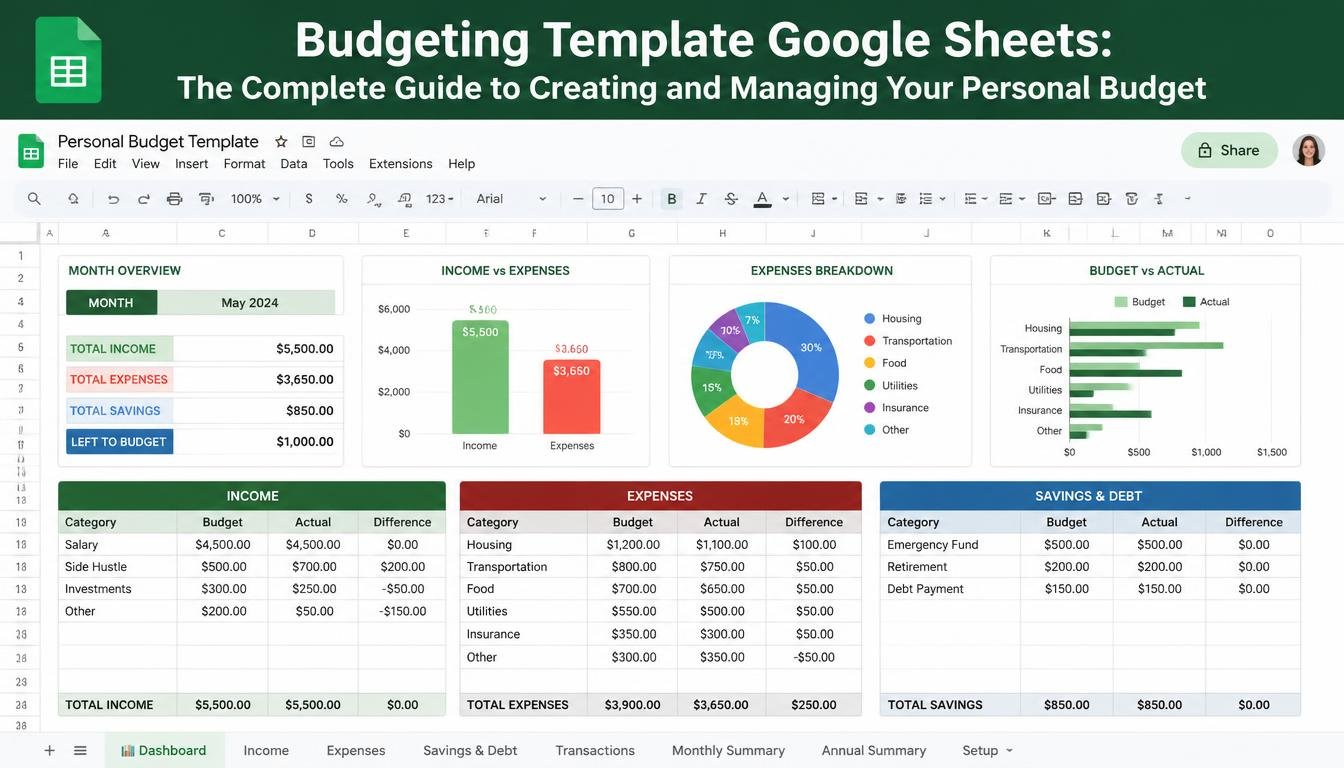
Managing money effectively has become more important than ever because daily expenses, subscriptions, bills, and unexpected costs can quickly affect your financial stability. Many people understand the importance of budgeting but struggle to find a simple system that helps them organize their income and expenses without making the process complicated. A budgeting template Google Sheets solution provides an easy and flexible way to track your financial activities because it allows you to create a personalized budget using a tool that many people already have access to.
A Google Sheets budgeting template can help you monitor monthly income, categorize expenses, identify unnecessary spending, and create realistic savings goals. Unlike complicated financial software, Google Sheets gives you complete control over your budget while allowing you to customize categories, formulas, charts, and tracking methods according to your personal needs. Whether you are a student, employee, freelancer, business owner, or someone trying to improve your financial habits, a well-designed budgeting spreadsheet can make managing money much easier.
In this guide, you will learn everything about budgeting template Google Sheets, including why it is useful, how to create one, which sections to include, how to track expenses, and how this simple tool can help you build better financial discipline.
What Is a Budgeting Template Google Sheets?
A budgeting template Google Sheets is a ready-made spreadsheet designed to help individuals organize and manage their finances. It usually contains sections for recording income, expenses, savings, bills, debt payments, and financial goals. Because Google Sheets works online, users can access their budget from different devices, update information anytime, and share the document when necessary.
The main purpose of a budgeting template is to provide a clear picture of where your money comes from and where it goes. Instead of guessing how much you spend each month, a budgeting spreadsheet allows you to record every financial transaction and analyze your spending patterns. This visibility helps you make smarter decisions, reduce unnecessary expenses, and create a realistic plan for achieving your financial goals.
A Google Sheets budgeting template can be simple or advanced depending on your needs. Beginners may only need basic sections for income and expenses, while experienced users may include debt tracking, investment planning, yearly summaries, and financial dashboards.
Why Use a Budgeting Template Google Sheets?
Using a budgeting template Google Sheets offers several advantages compared to traditional budgeting methods. Many people start budgeting with notebooks or basic notes on their phones, but these methods often become difficult to maintain because they lack automatic calculations and organized categories. A spreadsheet provides structure and makes financial tracking more efficient.
One of the biggest benefits of Google Sheets budgeting templates is customization. You can create categories based on your lifestyle, such as rent, groceries, transportation, entertainment, healthcare, education, subscriptions, and savings. This flexibility allows you to design a budgeting system that matches your personal financial situation.
Another important advantage is accessibility. Since Google Sheets is cloud-based, you can update your budget from your computer, tablet, or smartphone. This makes it easier to record expenses immediately instead of waiting until the end of the month when you may forget important purchases.
A budgeting template also improves financial awareness. When you regularly review your spending habits, you become more aware of where your money is being used. This awareness often leads to better decisions, such as reducing unnecessary purchases, increasing savings, or paying off debt faster.
Important Sections to Include in a Google Sheets Budget Template
A successful budgeting template Google Sheets file should include several important sections that provide a complete view of your finances. The structure can vary, but most effective templates include the following components.
Income Tracking Section
The income section records all money received during a specific period. This may include salary, freelance payments, business income, bonuses, rental income, or other sources of earnings. Tracking income accurately is the first step because your budget depends on knowing how much money is available.
A good income tracker should include the source of income, expected amount, actual amount received, and payment date. This helps you compare your planned income with your real earnings.
Expense Tracking Section
The expense section is one of the most important parts of any budgeting template Google Sheets document. It allows you to record daily spending and organize expenses into categories.
Common expense categories include:
- Housing and rent
- Food and groceries
- Transportation
- Utilities
- Insurance
- Entertainment
- Shopping
- Medical expenses
- Education
- Personal care
By reviewing these categories regularly, you can identify areas where you may be spending more than necessary.
Savings Goal Section
A good budget should not only track spending but also help you save money. A savings section allows you to set targets for emergency funds, vacations, investments, education, or major purchases.
You can include your savings goal, target amount, current savings, and completion percentage. This creates motivation because you can clearly see your progress over time.
Monthly Summary Dashboard
A monthly summary dashboard makes your budgeting template easier to understand. Instead of reviewing many rows of transactions, you can quickly see important information such as total income, total expenses, remaining balance, and savings progress.
Charts and visual summaries can also make financial information easier to analyze and encourage better money management decisions.
How to Create a Budgeting Template Google Sheets Step by Step
Creating your own budgeting template Google Sheets file is simple and does not require advanced spreadsheet skills. Start by opening Google Sheets and creating a new blank spreadsheet. Give your file a clear name such as “Monthly Budget Planner” or “Personal Finance Tracker.”
Next, create separate sections for income, expenses, savings, and financial goals. Add columns for dates, categories, descriptions, and amounts. Organizing information properly from the beginning will make your spreadsheet easier to maintain.
After creating the basic structure, add formulas that automatically calculate totals. For example, you can use formulas to calculate total income, total expenses, and remaining monthly balance. Automation reduces manual calculations and helps prevent mistakes.
You can also add color coding, filters, and charts to make your spreadsheet easier to read. A well-organized Google Sheets budget template should be simple enough that you will actually use it consistently.
Features of an Effective Budgeting Template Google Sheets
The best budgeting templates include features that make financial management easier. Some useful features include automatic calculations, expense categories, monthly comparisons, savings tracking, and debt management sections.
A flexible template should allow you to adjust categories as your financial situation changes. For example, a student may need education and transportation categories, while a family may need childcare and household expense categories.
Another important feature is simplicity. A complicated spreadsheet may look impressive but can become difficult to maintain. The best budget template is one that you can update regularly without feeling overwhelmed.
Budgeting Template Google Sheets vs Budgeting Apps
Many people wonder whether they should use a budgeting spreadsheet or a dedicated budgeting application. Both options have advantages, but Google Sheets provides unique benefits.
Budgeting apps often include automatic bank connections and advanced financial tools, but many require subscriptions or have limited customization options. Google Sheets gives users complete control over their financial tracking system and does not require payment.
For people who enjoy organizing information and want a personalized approach, a Google Sheets budgeting template is an excellent choice. It allows you to build a system based on your own goals rather than following a fixed format.
Tips for Successfully Using a Google Sheets Budget Template
Creating a budget is only the first step. The real results come from consistently using and reviewing your budgeting template. Update your spreadsheet regularly, preferably after every purchase or at least several times each week.
Review your budget at the end of every month to compare your planned spending with your actual expenses. Look for patterns and identify areas where improvements can be made.
Avoid creating unrealistic budgets. A successful budget should be practical and match your lifestyle. If you set limits that are impossible to follow, you may stop using your spreadsheet altogether.
Remember that budgeting is not about restricting yourself completely. It is about understanding your money and making intentional choices that support your financial goals.
Conclusion
A budgeting template Google Sheets file is one of the simplest and most effective tools for improving personal financial management. It provides a clear way to track income, monitor expenses, organize savings goals, and understand spending habits. Because Google Sheets is flexible, accessible, and customizable, anyone can create a budgeting system that fits their financial needs.
Whether you want to save more money, reduce unnecessary spending, pay off debt, or simply gain better control over your finances, a well-designed Google Sheets budget template can help you move toward your goals. The key to success is consistency. A budget only works when you regularly update it, review your progress, and use the information to make better financial decisions.
By using a budgeting template Google Sheets approach, you can transform your financial management from a confusing task into a simple and organized process.
Frequently Asked Questions (FAQ)
1. What is the best budgeting template Google Sheets for beginners?
The best budgeting template Google Sheets for beginners is one that includes simple sections for income, expenses, savings, and monthly summaries. Beginners should avoid overly complicated spreadsheets and start with a basic structure that is easy to update.
2. Is Google Sheets good for budgeting?
Yes, Google Sheets is an excellent budgeting tool because it is free, customizable, accessible from multiple devices, and allows users to create formulas and charts for financial tracking.
3. How do I create a monthly budget in Google Sheets?
To create a monthly budget in Google Sheets, create sections for income and expenses, add categories, enter your financial information, and use formulas to calculate totals and remaining balances.
4. Can I use a Google Sheets budget template for personal finance?
Yes, a Google Sheets budget template can be used for personal finance management. It can help track daily expenses, monthly bills, savings goals, debt payments, and overall financial progress.
5. How often should I update my budgeting spreadsheet?
You should update your budgeting spreadsheet regularly. Many people find it helpful to record expenses daily or review their budget several times each week to maintain accuracy.
6. Can a Google Sheets budgeting template help me save money?
Yes, a budgeting template can help you save money by showing your spending habits, identifying unnecessary expenses, and helping you create realistic savings goals.
7. Is a budgeting template Google Sheets better than a budgeting app?
A budgeting template Google Sheets may be better for users who want customization and full control over their financial data. Budgeting apps may be better for people who prefer automatic tracking features.



Domino’s Extravaganza: Complete Guide to the Popular Loaded Pizza

KT Tape Shoulder Rotator Cuff: How to Tape for Support and Pain Relief

Elle Brooke Dredd: Who Are They and What Does the Search Term Mean?

Katie Holmes and Joshua Jackson: Their Hollywood Journey, Connection, and Career Highlights

Pedro Vaz Paulo: Leadership, Business Strategy, and Professional Excellence

Belgium De Bruyne: Career, Achievements, Playing Style and Football Legacy
 Celebrity3 months ago
Katie Holmes and Joshua Jackson: Their Hollywood Journey, Connection, and Career Highlights
- Business3 months ago
Pedro Vaz Paulo: Leadership, Business Strategy, and Professional Excellence
- Celebrity3 months ago
Belgium De Bruyne: Career, Achievements, Playing Style and Football Legacy
- News3 months ago
Sea Isle News: Latest Local Updates, Events, Weather, and Community Stories
- Tech3 months ago
MindArk Entropia: The Complete Guide to the World’s Most Unique Virtual Economy
- Business2 months ago
Sportsman’s Warehouse Store Closures: Everything You Need to Know About Store Shutdowns, Business Strategy, and Future Growth
- Tech3 months ago
Mazda CX-5 2025: Complete Review, Specs, Features, Price, Performance, and Buying Guide
- Entertainment3 months ago
Brewzle: The Complete Guide to Everything You Need to Know